Waiting on something
Shipments, flight confirmations, trial-cancellation pages, support tickets — tabs you'll need when something changes, not right now. Close them. They'll be there when it's time.
TabLater snoozes Chrome tabs with plain English — type “tomorrow 9am” or “in 2 hours” and the tab returns the moment it actually matters. Free, no account, all data stays on your device.
Tab snoozing is a way to close a browser tab now and have it automatically reopen at a time you choose. Instead of leaving dozens of tabs open or burying a page in bookmarks you never revisit, you snooze the tab — it leaves your tab bar and comes back as a reminder exactly when it matters. TabLater is a free Chrome extension that snoozes tabs with natural language: type “tomorrow 9am”, “in 2 hours”, “next Friday”, or “every Monday”, and the tab closes immediately, then reopens at the scheduled moment with a Chrome notification. You can attach a note, schedule recurring tabs, and search your full history of reopened tabs — all stored on your device, with no account and no cloud.
Shipments, flight confirmations, trial-cancellation pages, support tickets — tabs you'll need when something changes, not right now. Close them. They'll be there when it's time.
A form due Friday 5pm. Taxes next week. A contract renewal in three months. Bring the tab back early enough to actually do the thing — not the day of.
A LinkedIn profile to message in two weeks. A job posting to apply to after the weekend. A cart you'll buy from on payday. Back when you're ready — not a moment before.
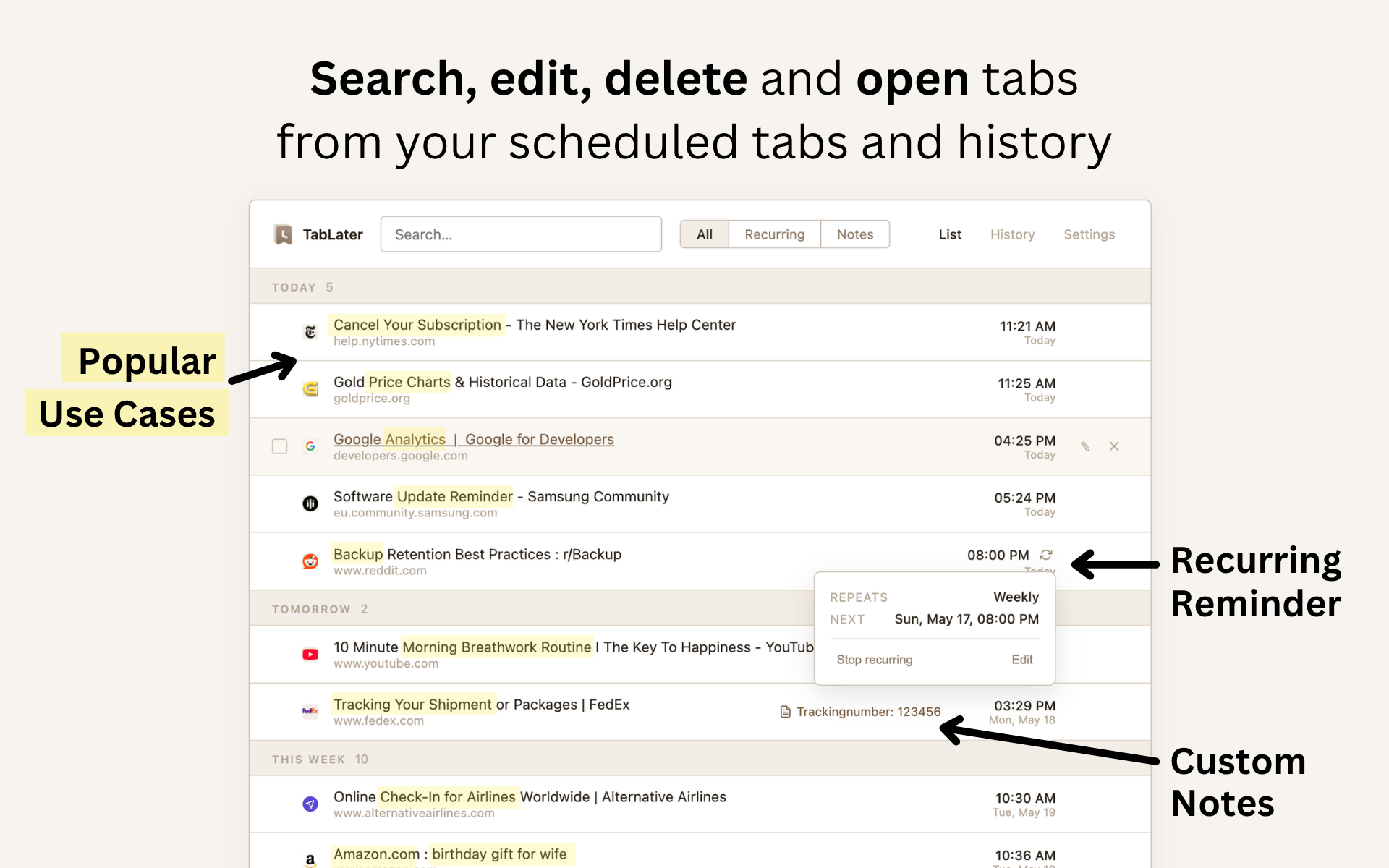
Weekly reviews. Monthly invoicing. Daily standup docs. Quarterly reports. Schedule the tab once, and it returns on rhythm — forever.
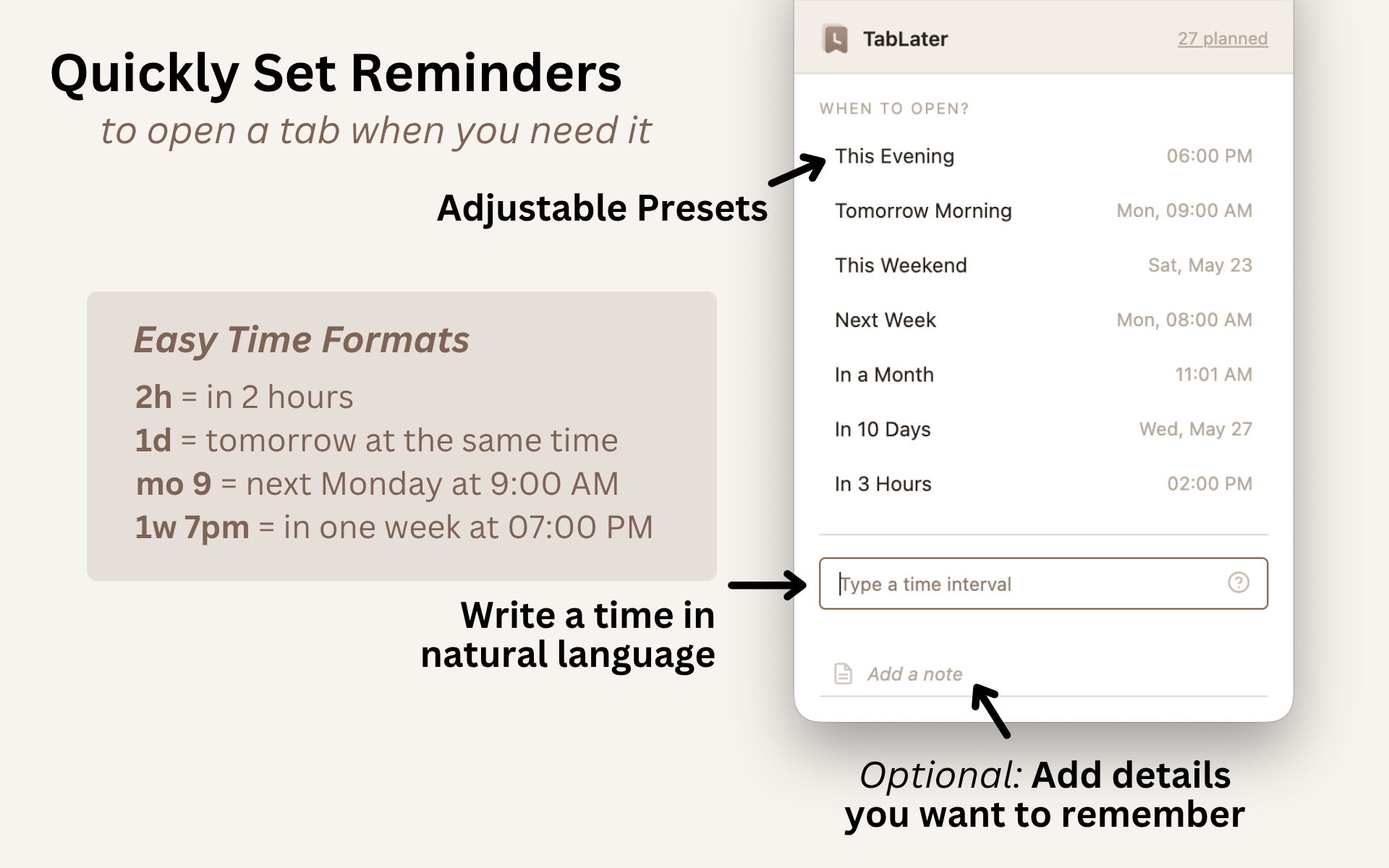
Type the way you think. TabLater parses expressions like in 2h, at 9am, Friday 5pm, or next month — and confirms the exact time before you commit.
Saved tabs live in chrome.storage.local. No account, no syncing, and no tab URLs, titles, or notes sent to TabLater.
Attach a note when you snooze a tab. When it comes back, so does the reason you saved it. No more staring at a reopened tab thinking “…why did I keep this?”
Every reopened tab stays in your local history. Search back through everything you've ever snoozed — it's all still there.
Every queued tab in one view, with time, note, and one-click reschedule. The whole queue, ordered and editable.
Daily reports, weekly reviews, monthly check-ins — schedule them once, and they'll reappear on rhythm.
Your data is portable. Export the full queue and history as JSON or CSV — take it anywhere, back it up, never locked in.
Read it later, remember it tomorrow, revisit it every Monday — you decide.
Pick a preset or type “in 2 hours”, “next Mon 9am”, or “every Friday”.
The tab closes instantly. TabLater reopens it at the exact moment — and pings you.
TabLater does not send saved tab URLs, titles, or notes to TabLater. There is no account and no sync. Your tab data lives in chrome.storage.local on your machine; only simple anonymous usage events are tracked.
Send a support request from the website or from inside the extension. Please include the page, browser, or reminder behavior you expected.
Tab snoozing is a way to close a browser tab now and have it automatically reopen at a time you choose. Instead of leaving dozens of tabs open or burying a page in bookmarks you never revisit, you snooze the tab: it leaves your tab bar and comes back as a reminder exactly when it matters. TabLater is a free Chrome extension that snoozes tabs with natural language — type tomorrow 9am, in 2 hours, next Friday, or every Monday, and the tab closes immediately, then reopens at the scheduled moment with a Chrome notification. You can attach a note, schedule recurring tabs, and search your full history of reopened tabs. Everything stays on your device in chrome.storage.local, with no account, no cloud, and no sync. In short, tab snoozing turns an overflowing tab bar into a set of timed, self-clearing reminders.
Yes. TabLater is a free Chrome extension. No subscription, no paid tier, no account.
Bookmarks pile up silently — you have to remember to go back to them. TabLater reopens the tab at the time you choose, with a Chrome notification. It's for pages that need to come back, not pages you want to keep forever.
Natural language like in 2 hours, tomorrow 9am, next Friday, Mon 8am, or every Monday. You can also pick a preset or set an exact date and time.
No — and that's the point. Your scheduled tabs, notes, and history live in chrome.storage.local on your machine. No cloud, no account, no tracking of tab content. If you want to move data, use the JSON or CSV export.
Yes. Schedule a tab once for every Monday 9am, 1st of the month, or any recurring rhythm — perfect for weekly reviews, monthly invoicing, or daily standup docs.
TabLater reopens the tab the next time Chrome runs. Nothing is lost.
TabLater is built for Chrome. Most Chromium-based browsers can install Chrome Web Store extensions, but only Chrome is officially supported.